Monday, December 15, 2008

Lecturenet service has started


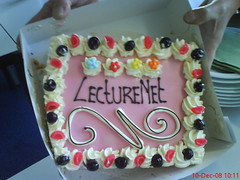
Officially the 'Lecturenet' service will not be starting until the first of January. We had a kick off meeting and had a cake to celebrate. There will be four recording sets available at Utrecht University for recordings. One for Arts and one for Social Sciences. The other two sets are available for all the departments of the university. All departments can request recordings at a fixed rate. Recordings are made by student assistants which are employed by a employment agency. The service is working hard on getting the website online with more information.
So finally a basic service has started, I do wonder how demand will develop.

Thursday, November 27, 2008

Scenario 2020: what will the virtual and real learning landscap look like?

In the run up to the Onderwijsdagen I was asked to think along in developing scenarios for the learning landscape in 2020. The resulting four scenarios were presented as a keynote at the Onderwijsdagen. Our group was asked to fill in the situation for an institution directed curriculum and a student owned VLE. It was a bit of a puzzle to match these two conditions but we came up with the following history:
Europe goes through an economic crisis in which Asia comes out as a winner. In the field of knowledge they truly are competetive with European education. This calls for drastic measures. The European education system is forced into a period of harsh competition. European governments rally and decide on a strong standardisation of curricula. A Bachelor degree in Psychology consists of the same modules in every country. To encourage competition and exchange students can choose to take each module wherever they please, they can attend a local university, take a module abroad or follow an online course. They receive coupons for their life of learning. (Naturally this also creates a trade in coupons). All courses are allowed, as long as they are certified. Institutions can employ coaches from a pool of teachers, which also have to be certified.
We took the exchange of standards much further, there will be more than just email and RSS protocols, many more exchange standards will have been agreed upon. There will be standards for the delivery of content, various communication tools and of course testing tools. This will allow students to 'plug' their course into their personal virtual living environment (PVLE) (facebook extended). As soon as they plug in their course the widgets required will be available for the student in their PVLE. In this age of fierce competition these PVLEs are being offered by commercial parties, Monroom is just an exmaple we came up with, but there are many more. Students are not interested in institution VLEs as they are constantly taking modules in different institutions, sometimes even simultaneously.

So this was our view, now all we need is 12 years of patience to see whether we got it right...

A number of students created a video to illustrate what 2020 would look like according to each of the four scenario's. Our video can be found here.
The overview of all scenario's (including the newspapers) can be found here.

Presentation on Weblectures at the Onderwijsdagen preconference

On Tuesday the 11th of November (yes, rather a while ago), I gave a presentation on the Weblectures pilot which ran at Utrecht University in 2007. This was part of a more technically minded preconference on implementing Weblectures. The two more interesting slides in this presentation (compared to previous presentations) are our findings on criteria for a recording system. Reliability proved to be a key criteria for us. One criteria which was notably absent was price of the system. Of course this is of some importance, but we also found out that there were so many more costs involved that this cost was only a small part of the total cost. The other criteria proved to be much more important.
The other interesting slide is the slide regarding organisation. Setting up an organisation for Weblectures requires getting people involved from all corners and departments of your institution. The trick is not to create an unwieldy large consultation body but to keep all the varied partners involved...

Wednesday, October 29, 2008

SURFmediacore presentation

Yesterday I attended the surfmediacore presentation. A long name for a soon to be available facility to store video's which can be accessed from a homegrown application using Webservices (REST calls to be precise). SURFnet will soon be calling for pilots to access this service. Institutions can connect with the service if they have a wish which is not a standard facility in Surfmedia.
An interesting meeting and off the cuff I suppose you could think along the following lines as an example of an application you could build:
1. A building block in Blackboard in which a teacher can directly upload a video in Blackboard and it will be directly embedded in the course.
2. Large uploads for the media libraries we have at present in our institutions. Possibly combined as a service with the university library. Drawback is the upload of copyrighted materials (same goes for 1.)
3. Alerting service for teachers. There has been an alerting service for years for researchers showing latest research. What about an alerting service for teachers showing the latest teaching materials which correspond to certain keywords/phrases. This is based on the ideas in the Zoep project. The university library could search the Surfmediacore collection and show the latest relevant video's as part of a larger alerting service. I do wonder whether you really need surfmediacore to do this. Probably the university could also do a harvest using the OAI exchange which is also available on the surfmediacore.

Utrecht University is now in the SURF-federation!

Finally it has been arranged: The Utrecht University authentication is now connected to the SURF-federation. The reason why I am so happy is that we can now advertise SURFmedia in our institution. No need to create an own account for teachers and now finally teachers can easily limit access to their video's: students can access them using their university ID. If you enter the url to the embedded video students are neatly requested to enter their ID. Sadly, if you enter the url of the page describing the video students do not get a clear request.
We are working on a teachers manual and then we can get on with advertising. The main limitation is of course the fact we cannot upload copyrighted materials. A large part of the videos used in classroom settings are copyrighted materials (which can legally be shown in a classroom, but cannot be copied to a streaming server....)

Monday, October 27, 2008

Who owns teaching materials?

Only a week ago I ran into an interesting question which arose for the first time. A member of the teaching staff had left university and removed course materials from his/her Blackboard course. Staff preparing the course site could not find the materials which were in place last year.
We have not got our Learning Objects repository in place yet, otherwise this would have been the perfect place to recover these documents. It does clearly show that a discussion on the intellectual property rights of teaching materials created by teachers is worth while. Actually: the discussion itself is not all the interesting, if a teacher has created materials while being employed by the university, the copyrights belong to the university. I practice however not everybody feels the same way about this and that is why it would be a good idea to raise this discussion.

Read my blog in Dutch

Thanks to a posting by Willem van Valkenburg I now have the Google translate widget on this blog. You can find it in the column on the right, half way down. The translations are reasonable, they sort of make sense. (I wonder how it will translate that sentence.)
This is of course also specially for Ineke who complained about my English at the last Blackboard user group meeting: Ineke, I hope this will help you out :-)

Friday, October 24, 2008

Do Weblectures require a new pedagogy?

I have been rather busy lately, and been away from my blog awhile. It is about time I posted some news. To start with I would like to respond to a discussion back in June which Rino Zandee posted on his blog (and Wilfred Rubens also wrote about) in response to an article in the NRC (and a posting on this blog).
Their position was: Weblectures require a new pedagogy.
I do not agree with them, but I think this is mainly a matter of definition. In the approach we have used at Utrecht University we have started to record lectures according to two models (both of which are called Weblectures):
1. Recording the F2F lecture for the students in the class. This was a very basic approach and has proven valuable. Students value the recordings as they can check part of the lectures, use them for revision and do not miss a lecture if they were ill. For students with several handicaps the recordings are extremely valuable as this allows them to follow the lecture again and improve their notes. For proof of this please read the full report.
Please note that trying to watch a full hour and a half of lecture is extremely boring, students only choose to do this if they really missed the lecture. We have never intended these weblectures as learning objects in their own right. In using this approach you do not need to change the pedagogy of the lecture, although of course a lecture can always be improved. In fact: teachers have improved their teaching by looking at their performance.
2. Creating a learning object specifically for online viewing. This is a completely different approach. An online lecture should be short, concise, rich in illustrations, 20 minutes max, preferably less. At least as important as the lecture is the embedding of this learning object in the learning process. Students do not generally learn by simply offering them information (a hint of a slight euphemism here ;-). They learn through activities in which they are required to apply the information acquired (assignments, discussions, essays and of course the classic exams). If this is your definition of a weblecture then yes: please do change your pedagogy before you stand in front of a camera.
Wednesday, September 17, 2008

A webbased editor for recorded lectures for teachers

An interesting selling point offered by Echo360. They are now offering their recording boxes. We had one concern when looking at this recording solution. The boxes are thin clients and they require a network connection to the server to operate. In several cases we have had to recordings in spots where there was no network connection present or the firewall ports where not open. This does limit the application of a capture box.
One thing I am intrigued by is the option of allowing teachers to edit their own presentation through a webeditor. This certainly does allow for easier adapting by teaching staff to their pedagogical approach. Editing a recording allows for easily creating reusable learning objects, rather than full lectures. At present our editing has to be done by (busy) audio visual staff. Of course allowing teachers to edit also means administration, giving each teacher access to his/her own recording.
For more information check out their website: http://www.echo360.com/verbatim/

Tuesday, September 09, 2008

Presentation at Surfnet on Weblectures

Surfnet has just started a pilot in which institutions of higher education in the Netherlands can participate in evaluating three different systems for recording and broadcasting lectures: Mediasite, Presentations2Go and a solution built on Apple podcast server. I was a little saddened to see that the Apple podcast solution still does not offer true navigable content by slide. The video still is being delivered as picture within picture. I remember a presentation years ago where Apple explained this was possible but nobody had built it. Today I heard that it still isn't quite available yet...

I was asked to give a presentation on our findings regarding Rich Media (is it worthwhile?) and criteria we found important in the choice for a Rich Media system.
You can find my presentation below.

Thursday, September 04, 2008

Academic trained teachers in the news

The National news showed an item last Monday on the ALPO (Academic Teacher Training Course Primary Education) which has just started here at Utrecht University. I tried to distill the right snippet using the Virtual Cutting machine and it seemed to work. Theoretically you should be able to watch the snippet below:
However the paramaters start=584&end=721.6 are not being passed through properly. The result is that you do not see the entire news, only a selected amount of time starting at the beginning of the video.

ALPO in NOS Journaal 1 sept 18 uur

Tuesday, September 02, 2008

Animation on Surf media

I have finally got round to trying out Surf Media. It does actually seem to work. As a proof here an embedded video (original was Quicktime). The animation is a product created for the Partner Project to illustrate the concept of a Virtual Knowledge Centre. The animation itself is also quite interesting.


Monday, September 01, 2008

The new strict style?

This morning I attended the introduction lecture for all the students of pedagogical and learning sciences entering the faculty this year. It was extra exciting as the first group of ALPO (Academic teacher training course for primary education) students was present. This course is a first in Dutch Higher education and is a cooperation between the professional (Hogeschool Utrecht) and academic (Universiteit Utrecht) university in Utrecht.

The vice dean did warm all students present about the new 'strictness' which they can expect in their courses. Students are expected to pass enough modules in their first year, plaguerism is a serious offence which will not go unpunished and there is a Dutch language test for all students. This is not compulsory, but is strongly advised. Essays containing several mistakes will be returned ungraded.

And now all the hallways are bustling with firstyear students.

Manual Blackboard Grade Center

Having switched to Blackboard 8 our teaching staff is confronted with the new grade book, now renamed to Grade Center. We have written a quick manual (in Dutch) which can be found here.

Some small observations:
- Uses AJAX technology, and works fine on all platforms. We had slow loading on our (rather old) test server, but this is not a problem on our production server.
- Offers a lot of facilities that teachers do not all need and does confuse a little
- Finally teachers can view and grade the grade list by group(s). This does require creating a 'Custom view' first.
- Does not offer a decent calculated final grade on a score of 1 to 10.

Tuesday, August 26, 2008

Tip for more manuals and instructions


Kelly Sonora was kind enough to send me a link with lots of valuable manuals and instructions for teaching staff using Blackboard. And these are all in English!!

The address of the posting is at:
http://www.smartteaching.org/blog/2008/08/the-ultimate-guide-to-blackboard-100-tips-tutorials/
They certainly have done a great job! I see they are also using the Teams LX building block as a Wiki solution.

Wiki in Blackboard - yet another manual

A well known drawback in most traditional VLE's is the lack of possibilities for structured input by students. One tool which can allow students room to add input in a structured fashion and collaborate on a collection of knowledge is the Wiki.
Sadly Blackboard does not offer this in the core code. Some teachers have requested a Wiki but in first instance it would be best to have a closed wiki for groups of students.
In order to gain some experience we have decided to try out the Teams LX building block offered by Learning Objects. I have ran it through and it seems to be very comprehensive. It allows for private group wikis which will automatically become accesible to the other students in the class after a predefined date. It also allows for commenting and exporting the final product to a public website.
I will be following a number of courses using this Wiki and am very intrigued how students and teachers will respond to this new tool.

The teachers manual (in Dutch) can be found here.
The students manual (in Dutch) can be found here.

Sign up sheets in Blackboard

We are also using the Blackboard Sign-up sheets building block. The teachers manual (in Dutch) can be found here.

The new Peer review module in Blackboard 8

We are now running Blackboard 8 at Utrecht University. On of the great improvements is the Peer Review tool which has been added. It really does seem well thought out and connects well with the practice of Peer reviewing that a number of our teaching staff have adopted. I see a great advantage in the way it can save teachers time in organising the whole process: it enforces deadlines and distributes essays anonymously.
The teachers manual (in Dutch) can be found here.
And the students manual (also in Dutch) can be found here....
If anybody would like the original files, please contact me.

Back from the Queyras


I have just returned from a great holiday hiking in the French Alps, in the Queyras region to be precise. It was great. Amongst other things we hiked to the rifugio Granero and the Rifugio Jervis (both excellent Italian meals), clambered up the Col Selliere, Col Lacroix, Col d'Urine, Col Vieux and some others but finishing off with the peaks: Pic de Foreant and of course the Pain de Sucre. To keep ourselves amused we also did a lovely klettersteig and some very child-friendly rafting.
And now its back to work....

Thursday, July 24, 2008

Another player on the mini laptop market


An add in a local newspaper pointed me at the Acer Aspire One. It is yet another mini notebook. With a weight of under a kilo and 8,9 inch screen it seems quite a nice product. I found a review at cnet. It certainly is a nice price at 299 euros, shame about the trackpad buttons and the weak battery.
I am still happy with my Asus Eee, but the 7 inch screen is still rather small and I am disappointed with the updates Asus has provided for the Xandros operating system. I do hope Acer will do a better job with the Linus Lite OS they are using on the Aspire One. It is interesting that the hardware manufacturers are the ones responsible for supporting open Source operating systems...